TABLE OF CONTENTS |
Overview
The Abandoned Shopping Cart app helps venues recover bookings that would otherwise be lost by re-engaging customers who abandon checkout after providing their contact information.
Through targeted follow-up messaging, venues can encourage guests to return and complete their purchase. The feature uses a campaign-based approach to abandoned cart recovery, enabling coordinated email outreach with customizable messaging. Built-in reporting provides visibility into abandoned carts, recovered bookings, and generated leads. The Abandoned Shopping Cart app is designed to improve conversion rates and drive incremental revenue through more intentional, measurable recovery efforts.
Value to Customer
Venues benefit by recovering lost revenue with minimal ongoing effort once campaigns are set up, while also gaining clear visibility into performance and access to actionable lead data.
Example Use Cases:
- Automatically re-engage customers who selected tickets but didn’t complete booking
- Send timed follow-up reminders via email
- Monitor abandoned cart recovery performance in a dashboard
- View a table of all abandoned cart leads with readily accessible contact information for follow-up or analysis
For Sales and Marketing teams, this feature can be positioned as:
- “Turn abandoned carts into bookings automatically”
- “Recover revenue without additional ad spend”
- “Full visibility into abandoned cart performance and leads”
How it Works
Abandoned Shopping Cart tracks customers who enter contact information (first name, last name, and email) in the ACME Online Sales flow but do not complete their booking. These customers are surfaced as leads in the app and will receive automated recovery campaigns via email.
If a customer converts within 14 days after receiving a message, that booking is attributed as a recovered booking.
A lead is counted as converted if they place an order with the same email address that exists on the lead.Setup
Ask your Client Success Manager Manager to enable access to the ACME App Store! To use the Abandoned Booking feature, you must utilize ACME's Online Sales platform.High-level Setup Flow for Venues:
Contact your Client Success Manager to enable the ACME App Store.
Backoffice users who need to see and configure the app will need the app-admin permission.
This permission is included in the new role app-admin
The app-admin role has been seeded to the superuser and superadmin groups
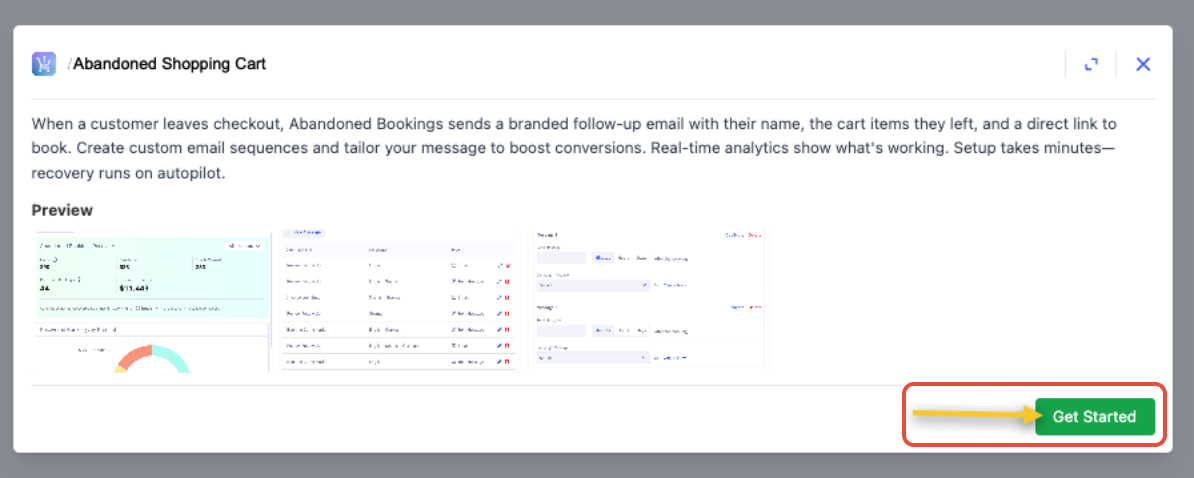
In ACME Backoffice > Apps > Abandoned Shopping Cart > Click Get Started
Build Messages
Click Campaign Messages to create your Campaign Messages, which are the emails that will be sent to your customers who abandoned their bookings.

Click New Message to create a new message or you can edit an existing message
When creating a New Campaign Message, there are several configuration options:
Keep the ready-to-go default email as is
Configure a custom email. On the email you can specify:
Internal Name: This is the identifying name of the email message. End users will not see this name, it is simply so admins configuring the app can reuse the email message in various campaigns.
Reply-To Email: if a customer hits 'reply' on the abandoned booking email this 'reply-to email' will receive their responses.
To customize the email content, toggle Email Options to Custom and Preview to the pencil
The following Dynamic Variables can be added to the email:
First name
Last name
Email
Event Name
Event Date/Time
Tenant Name
Checkout URL
Note: All emails automatically include “unsubscribe from this list” at the bottom of the message
Preview how the email looks by clicking the eye in the Preview section
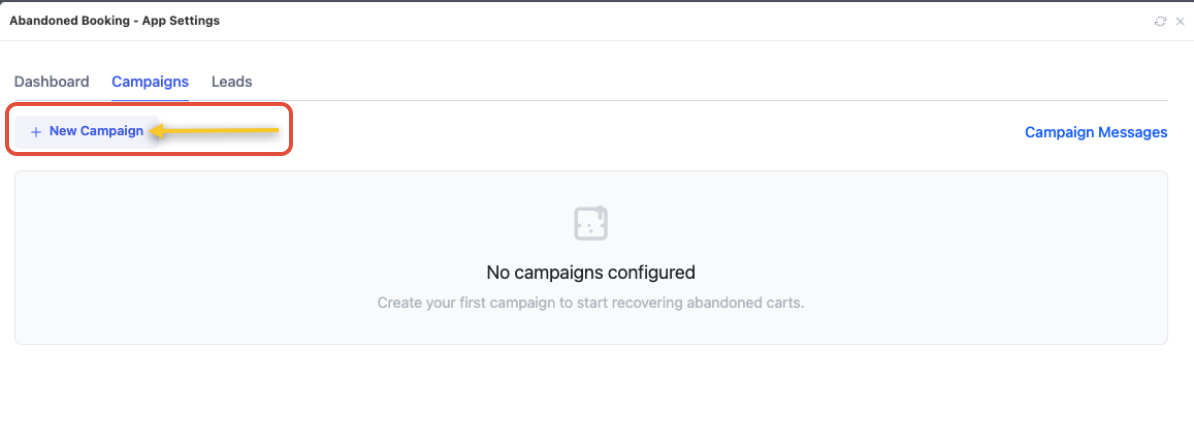
Create your first campaign by Clicking +New Campaign
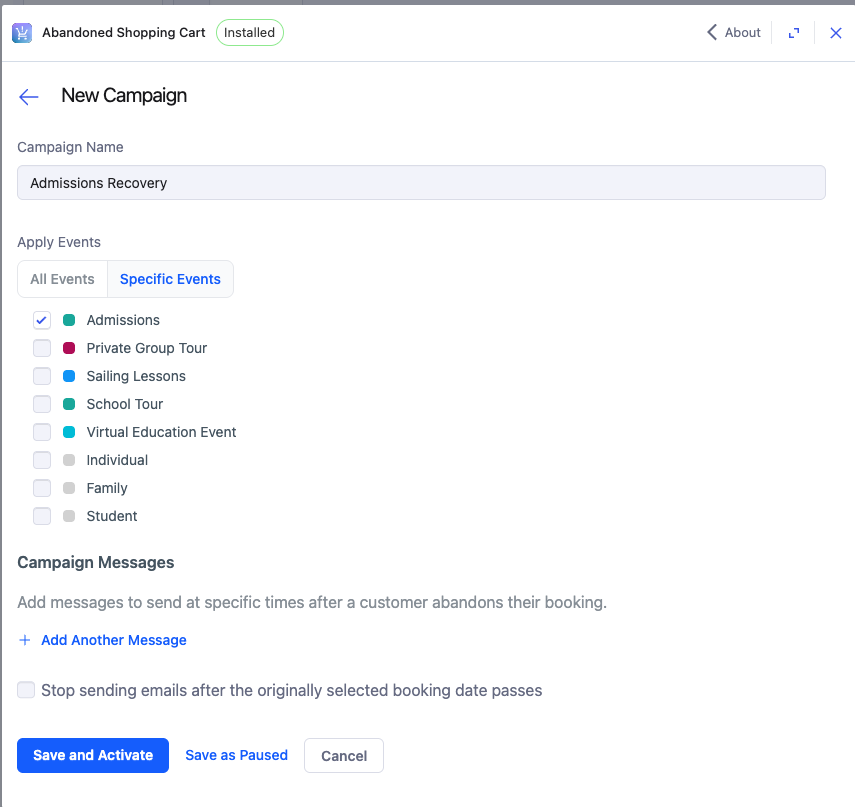
Specify a Campaign Name
Specify which events the Campaign applies to
All Events: This campaign will be sent to users who abandons a cart that contains any event
Specific Events: This campaign will be sent to users who abandon that specific event only
Note: If an abandon cart meets the criteria of more than 1 campaign, they will only qualify for 1 campaign. The order of the campaigns within the app dictates which campaign they will enter. The first campaign the lead qualifies for will be applied.
Specify the timing of send after abandonment
Then assign the Campaign Message that will be sent out. You can select a previously configured campaign message or you can create a new one.
Optionally, you can add additional messages that will be sent to the customer in the specified time after abandonment
Optionally, you can say whether to stop sending emails after the originally selected booking date passes
Click Save and Activate
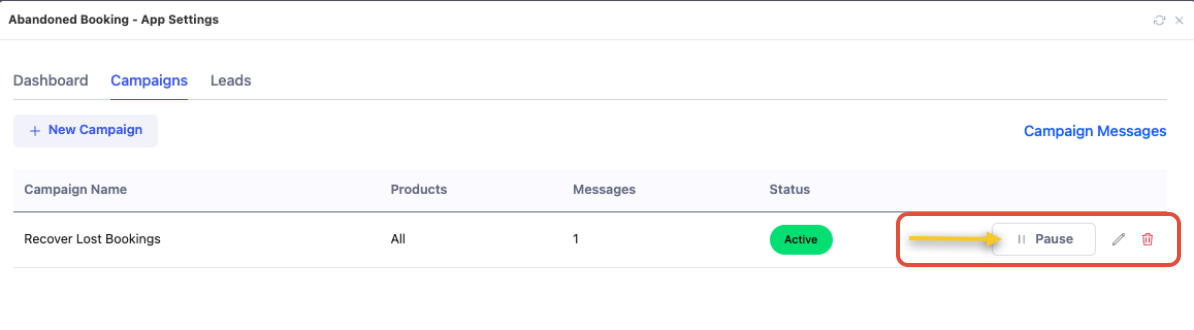
To pause a campaign, simply click Pause from the Campaigns tab. This will halt any messages from going out to new or existing leads.
In Action
Customer Flow
- Customer builds a cart in ACME Online Sales
- Selects date, time, and Events (Note: Support for items other than "Events" will be coming in future releases)
- Inputs first name, last name, and email
- Clicking “continue” is not required for contact info to be recorded in the app
- Customer abandons checkout (does not complete booking)
- If the customer completes booking within 1 hour of entering contact info:
- Counted as an organic conversion
- The conversion is not attributed to the abandoned shopping cart app and no messages are sent.
- If a published campaign exists then email messages are sent according to the campaign's configured timing
- Scheduled messages stop sending if:
- The customer converts mid-campaign
- Campaign is paused (they will not re-start for customers that were already in the flow)
How is conversion calculated?
If a customer completes any order within 14 days of abandonment and receiving a message, we consider that to be a recovered shopping cart.
Note: A customer does not need to complete their booking from the email link itself to be considered a "conversion" as long as they complete a booking within 14 days of their original abandonment and enter in the same contact email during purchase.Reporting
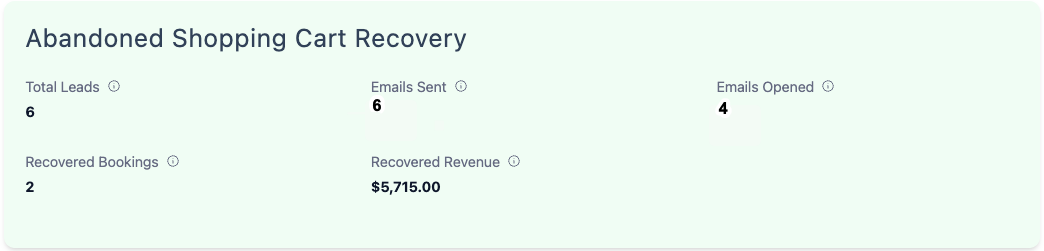
The Abandoned Shopping Cart Recovery performance dashboard in the app shows the following metrics:
- Total Leads - Count of customers who “abandoned”, meaning they inputted their contact info and then did not complete the booking within 1 hour
- Emails Sent - Count of emails sent
- Emails Opened - Count of emails opened
- Recovered Bookings - Count of bookings made from customers who received an abandoned shopping cart message, made within 14 days of abandonment
- Recovered Revenue - Revenue from ^
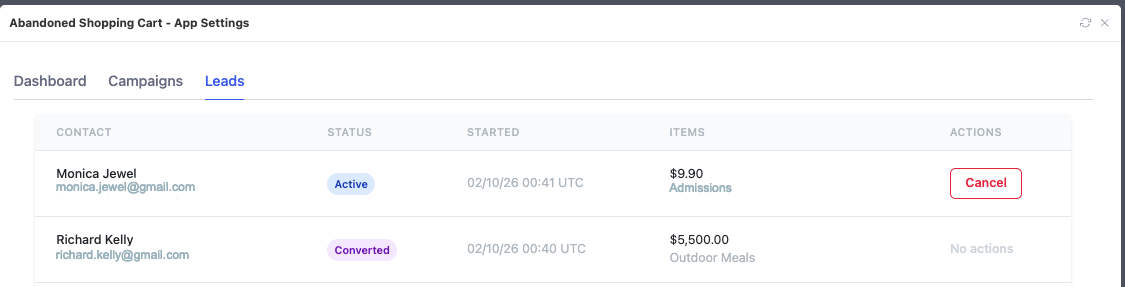
Leads Table
The Leads table shows all leads, including contact information and current status. As messages are sent the message details and events (delivered, opened, clicked) are also added.
- Statuses:
- Active - Currently in a campaign
- Converted - Were in a campaign, and then purchased
- Canceled-
- Venue manually canceled it via the app UI
- Customer booked on their own before we ever reached out to them
- Campaign was paused while they were in the middle of it