
Overview
In ACME, we do not have a way to remove partial line items from an order, even by data fix. For this reason, partial refund requests require extra adjustments to account for the removal of an entire line item.
Adding an Adjustment to the Order
Before we can submit a partial refund request to Finance, we first need the client to adjust the order so that when we remove the entire line item requested, the order still reflects the remaining balance.
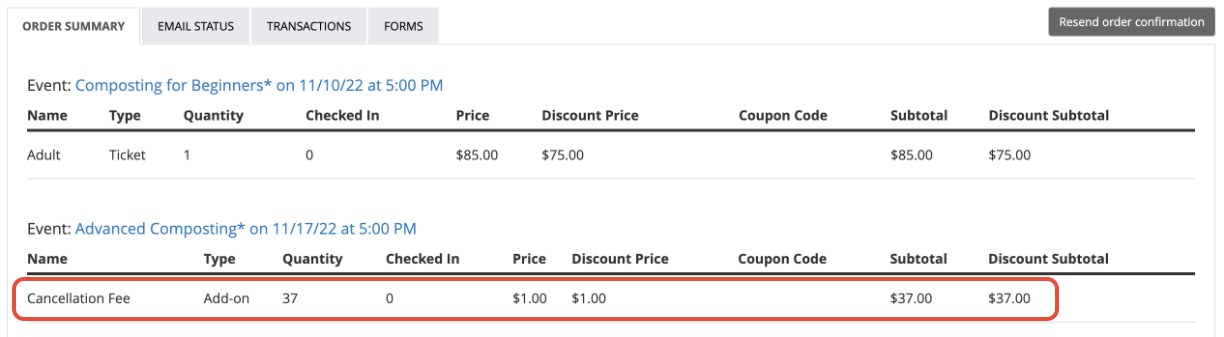
To add this adjustment, the client will need to add an Add-On to the order with a payment method of cash. The value of the Add-On should reflect the amount that should remain on the order once the entire line item has been removed. Many of our clients who frequently request this process already have an Add-On established for this purpose, usually labeled Refund Adjustment, etc. They typically create this Add-On as a $1 item and adjust the quantity to customize the value of the Add-On as needed.
So for example, if the order contains a $75 event ticket, and the client would like a 50% refund of that ticket ($38), we would need them to add a $37 Add-On paid with a payment method of cash. Once the $38 is refunded through WorldPay and the $75 event ticket is removed by data fix, $37 will remain on the order.
Submitting the Manual Refund Request to Finance and Data Fixing the Order
Follow the normal manual refund protocol to add this request to the Smartsheet for the client's payment processor. Make sure that the amount to refund matches the client's request, and leave details in the Notes column (ie "Partial: remove the Printmaking Class event ticket").
Once the manual refund is completed on the Finance side, you can then use the Order Refund API to remove the entire requested line item from the order, leaving the Add-On to represent the remaining balance.
File a JIRA for Settlement Purposes
Once the refund and data fix are complete, you will need to file a JIRA and assign it to Vy so that she can manually adjust the settlement with the client. Note the amount of the adjustment added to the order, the amount refunded, and the value of the event ticket that was removed from the order.
Example:
Client is requesting a partial manual refund of order 101290802. The member purchased a $75 ticket and would like a 50% refund. A cash adjustment of $37 has been added to the order by FMG staff so that ACME staff can remove the $75 ticket and issue a $38 refund through WP. The refund in WP and data fix in BackOffice is complete.